1、Pod 水平自动扩缩
Pod水平自动扩缩(Horizontal Pod Autoscaler) 可以基于 CPU 利用率自动扩缩 ReplicationController、Deployment、ReplicaSet 和 StatefulSet 中的 Pod 数量。 除了 CPU 利用率,也可以基于其他应程序提供的 自定义度量指标 来执行自动扩缩。 Pod 自动扩缩不适用于无法扩缩的对象,比如 DaemonSet。
Pod水平自动扩缩特性由 Kubernetes API 资源和控制器实现。资源决定了控制器的行为。 控制器会周期性地调整副本控制器或 Deployment 中的副本数量,以使得类似 Pod 平均 CPU 利用率、平均内存利用率这类观测到的度量值与用户所设定的目标值匹配。
2、Horizontal Pod Autoscaler 如何工作
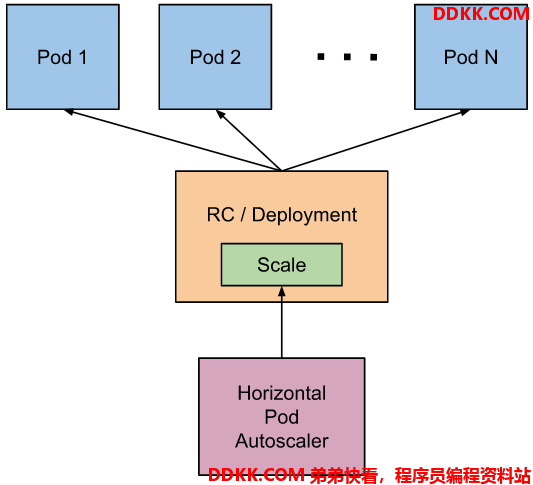
Pod水平自动扩缩器的实现是一个控制回路,由控制器管理器的 --horizontal-pod-autoscaler-sync-period 参数指定周期(默认值为 15 秒)。
每个周期内,控制器管理器根据每个 HorizontalPodAutoscaler 定义中指定的指标查询资源利用率。 控制器管理器可以从资源度量指标 API(按 Pod 统计的资源用量)和自定义度量指标 API(其他指标)获取度量值。
- 对于按 Pod 统计的资源指标(如 CPU),控制器从资源指标 API 中获取每一个 HorizontalPodAutoscaler 指定的 Pod 的度量值,如果设置了目标使用率, 控制器获取每个 Pod 中的容器资源使用情况,并计算资源使用率。 如果设置了 target 值,将直接使用原始数据(不再计算百分比)。 接下来,控制器根据平均的资源使用率或原始值计算出扩缩的比例,进而计算出目标副本数。
需要注意的是,如果 Pod 某些容器不支持资源采集,那么控制器将不会使用该 Pod 的 CPU 使用率。
- 如果 Pod 使用自定义指示,控制器机制与资源指标类似,区别在于自定义指标只使用 原始值,而不是使用率。
- 如果 Pod 使用对象指标和外部指标(每个指标描述一个对象信息)。 这个指标将直接根据目标设定值相比较,并生成一个上面提到的扩缩比例。 在 autoscaling/v2beta2 版本 API 中,这个指标也可以根据 Pod 数量平分后再计算。
通常情况下,控制器将从一系列的聚合 API(metrics.k8s.io、custom.metrics.k8s.io 和 external.metrics.k8s.io)中获取度量值。 metrics.k8s.io API 通常由 Metrics 服务器(需要额外启动)提供。 可以从 metrics-server 获取更多信息。 另外,控制器也可以直接从 Heapster 获取指标。
说明:
FEATURE STATE: Kubernetes 1.11 [deprecated]
自 Kubernetes 1.11 起,从 Heapster 获取指标特性已废弃。
自动扩缩控制器使用 scale 子资源访问相应可支持扩缩的控制器(如副本控制器、 Deployment 和 ReplicaSet)。 scale 是一个可以动态设定副本数量和检查当前状态的接口。
3、HPA的基本算法
pod水平自动扩缩控制器根据当前指标和期望指标来计算扩缩比例。
期望副本数 = ceil[当前副本数 * (当前指标 / 期望指标)]
例如,当前度量值为 200m,目标设定值为 100m,那么由于 200.0/100.0 == 2.0, 副本数量将会翻倍。 如果当前指标为 50m,副本数量将会减半,因为50.0/100.0 == 0.5。 如果计算出的扩缩比例接近 1.0 (根据--horizontal-pod-autoscaler-tolerance 参数全局配置的容忍值,默认为 0.1), 将会放弃本次扩缩。
如果HorizontalPodAutoscaler 指定的是 targetAverageValue 或 targetAverageUtilization, 那么将会把指定 Pod 度量值的平均值做为 currentMetricValue。 然而,在检查容忍度和决定最终扩缩值前,我们仍然会把那些无法获取指标的 Pod 统计进去。
所有被标记了删除时间戳(Pod 正在关闭过程中)的 Pod 和失败的 Pod 都会被忽略。
如果某个 Pod 缺失度量值,它将会被搁置,只在最终确定扩缩数量时再考虑。
当使用CPU 指标来扩缩时,任何还未就绪(例如还在初始化)状态的 Pod 或 最近的指标 度量值采集于就绪状态前的 Pod,该 Pod 也会被搁置。
由于受技术限制,Pod 水平扩缩控制器无法准确的知道 Pod 什么时候就绪, 也就无法决定是否暂时搁置该 Pod。 --horizontal-pod-autoscaler-initial-readiness-delay 参数(默认为 30s)用于设置 Pod 准备时间, 在此时间内的 Pod 统统被认为未就绪。 --horizontal-pod-autoscaler-cpu-initialization-period 参数(默认为5分钟) 用于设置 Pod 的初始化时间, 在此时间内的 Pod,CPU 资源度量值将不会被采纳。
在排除掉被搁置的 Pod 后,扩缩比例就会根据 currentMetricValue/desiredMetricValue 计算出来。
如果缺失任何的度量值,我们会更保守地重新计算平均值, 在需要缩小时假设这些 Pod 消耗了目标值的 100%, 在需要放大时假设这些 Pod 消耗了 0% 目标值。 这可以在一定程度上抑制扩缩的幅度。
此外,如果存在任何尚未就绪的 Pod,我们可以在不考虑遗漏指标或尚未就绪的 Pod 的情况下进行扩缩, 我们保守地假设尚未就绪的 Pod 消耗了期望指标的 0%,从而进一步降低了扩缩的幅度。
在扩缩方向(缩小或放大)确定后,我们会把未就绪的 Pod 和缺少指标的 Pod 考虑进来再次计算使用率。 如果新的比率与扩缩方向相反,或者在容忍范围内,则跳过扩缩。 否则,我们使用新的扩缩比例。
注意,平均利用率的原始值会通过 HorizontalPodAutoscaler 的状态体现( 即使使用了新的使用率,也不考虑未就绪 Pod 和 缺少指标的 Pod)。
如果创建 HorizontalPodAutoscaler 时指定了多个指标, 那么会按照每个指标分别计算扩缩副本数,取最大值进行扩缩。 如果任何一个指标无法顺利地计算出扩缩副本数(比如,通过 API 获取指标时出错), 并且可获取的指标建议缩容,那么本次扩缩会被跳过。 这表示,如果一个或多个指标给出的 desiredReplicas 值大于当前值,HPA 仍然能实现扩容。
最后,在 HPA 控制器执行扩缩操作之前,会记录扩缩建议信息。 控制器会在操作时间窗口中考虑所有的建议信息,并从中选择得分最高的建议。 这个值可通过 kube-controller-manager 服务的启动参数 --horizontal-pod-autoscaler-downscale-stabilization 进行配置, 默认值为 5 分钟。 这个配置可以让系统更为平滑地进行缩容操作,从而消除短时间内指标值快速波动产生的影响。
4、API 对象
HorizontalPodAutoscaler 是 Kubernetes autoscaling API 组的资源。 在当前稳定版本(autoscaling/v1)中只支持基于 CPU 指标的扩缩。
API的 beta 版本(autoscaling/v2beta2)引入了基于内存和自定义指标的扩缩。 在 autoscaling/v2beta2 版本中新引入的字段在 autoscaling/v1 版本中以注解 的形式得以保留。
5、HPA的部署测试
5.1部署metrics-server
官方代码仓库地址:https://github.com/kubernetes-sigs/metrics-server
wget https://github.com/kubernetes-sigs/metrics-server/releases/download/v0.4.4/components.yaml
mv components.yaml metrics-server.yaml
metrics-server.yaml
apiVersion: v1
kind: ServiceAccount
metadata:
  labels:
    k8s-app: metrics-server
  name: metrics-server
  namespace: kube-system
---
apiVersion: rbac.authorization.k8s.io/v1
kind: ClusterRole
metadata:
  labels:
    k8s-app: metrics-server
    rbac.authorization.k8s.io/aggregate-to-admin: "true"
    rbac.authorization.k8s.io/aggregate-to-edit: "true"
    rbac.authorization.k8s.io/aggregate-to-view: "true"
  name: system:aggregated-metrics-reader
rules:
- apiGroups:
  - metrics.k8s.io
  resources:
  - pods
  - nodes
  verbs:
  - get
  - list
  - watch
---
apiVersion: rbac.authorization.k8s.io/v1
kind: ClusterRole
metadata:
  labels:
    k8s-app: metrics-server
  name: system:metrics-server
rules:
- apiGroups:
  - ""
  resources:
  - pods
  - nodes
  - nodes/stats
  - namespaces
  - configmaps
  verbs:
  - get
  - list
  - watch
---
apiVersion: rbac.authorization.k8s.io/v1
kind: RoleBinding
metadata:
  labels:
    k8s-app: metrics-server
  name: metrics-server-auth-reader
  namespace: kube-system
roleRef:
  apiGroup: rbac.authorization.k8s.io
  kind: Role
  name: extension-apiserver-authentication-reader
subjects:
- kind: ServiceAccount
  name: metrics-server
  namespace: kube-system
---
apiVersion: rbac.authorization.k8s.io/v1
kind: ClusterRoleBinding
metadata:
  labels:
    k8s-app: metrics-server
  name: metrics-server:system:auth-delegator
roleRef:
  apiGroup: rbac.authorization.k8s.io
  kind: ClusterRole
  name: system:auth-delegator
subjects:
- kind: ServiceAccount
  name: metrics-server
  namespace: kube-system
---
apiVersion: rbac.authorization.k8s.io/v1
kind: ClusterRoleBinding
metadata:
  labels:
    k8s-app: metrics-server
  name: system:metrics-server
roleRef:
  apiGroup: rbac.authorization.k8s.io
  kind: ClusterRole
  name: system:metrics-server
subjects:
- kind: ServiceAccount
  name: metrics-server
  namespace: kube-system
---
apiVersion: v1
kind: Service
metadata:
  labels:
    k8s-app: metrics-server
  name: metrics-server
  namespace: kube-system
spec:
  ports:
  - name: https
    port: 443
    protocol: TCP
    targetPort: https
  selector:
    k8s-app: metrics-server
---
apiVersion: apps/v1
kind: Deployment
metadata:
  labels:
    k8s-app: metrics-server
  name: metrics-server
  namespace: kube-system
spec:
  selector:
    matchLabels:
      k8s-app: metrics-server
  strategy:
    rollingUpdate:
      maxUnavailable: 0
  template:
    metadata:
      labels:
        k8s-app: metrics-server
    spec:
      containers:
      - args:
        - --cert-dir=/tmp
        - --secure-port=4443
        - --kubelet-preferred-address-types=InternalIP,ExternalIP,Hostname
        - --kubelet-use-node-status-port
       image: k8s.gcr.io/metrics-server/metrics-server:v0.4.4
        image: harbor.ywx.net/k8s-baseimages/metrics-server:v0.4.4
        imagePullPolicy: IfNotPresent
        livenessProbe:
          failureThreshold: 3
          httpGet:
            path: /livez
            port: https
            scheme: HTTPS
          periodSeconds: 10
        name: metrics-server
        ports:
        - containerPort: 4443
          name: https
          protocol: TCP
        readinessProbe:
          failureThreshold: 3
          httpGet:
            path: /readyz
            port: https
            scheme: HTTPS
          periodSeconds: 10
        securityContext:
          readOnlyRootFilesystem: true
          runAsNonRoot: true
          runAsUser: 1000
        volumeMounts:
        - mountPath: /tmp
          name: tmp-dir
      nodeSelector:
        kubernetes.io/os: linux
      priorityClassName: system-cluster-critical
      serviceAccountName: metrics-server
      volumes:
      - emptyDir: {}
        name: tmp-dir
---
apiVersion: apiregistration.k8s.io/v1
kind: APIService
metadata:
  labels:
    k8s-app: metrics-server
  name: v1beta1.metrics.k8s.io
spec:
  group: metrics.k8s.io
  groupPriorityMinimum: 100
  insecureSkipTLSVerify: true
  service:
    name: metrics-server
    namespace: kube-system
  version: v1beta1
  versionPriority: 100
运行metrics-server.yaml清单
#运行metrics-server前
root@k8s-master01:/apps/k8s-yaml/hpa# kubectl top nodes
W1028 22:12:32.344418  107255 top_node.go:119] Using json format to get metrics. Next release will switch to protocol-buffers, switch early by passing --use-protocol-buffers flag
error: Metrics API not available
#运行metrics-server后
root@k8s-master01:/apps/k8s-yaml/hpa# kubectl apply -f metrics-server.yaml
serviceaccount/metrics-server created
clusterrole.rbac.authorization.k8s.io/system:aggregated-metrics-reader created
clusterrole.rbac.authorization.k8s.io/system:metrics-server created
rolebinding.rbac.authorization.k8s.io/metrics-server-auth-reader created
clusterrolebinding.rbac.authorization.k8s.io/metrics-server:system:auth-delegator created
clusterrolebinding.rbac.authorization.k8s.io/system:metrics-server created
service/metrics-server created
deployment.apps/metrics-server created
apiservice.apiregistration.k8s.io/v1beta1.metrics.k8s.io created
#使用kubectl top nodes命令可以显示所有节点的CPU和MEM使用状态
root@k8s-master01:/apps/k8s-yaml/hpa# kubectl top nodes
W1028 22:12:55.126877  107834 top_node.go:119] Using json format to get metrics. Next release will switch to protocol-buffers, switch early by passing --use-protocol-buffers flag
NAME             CPU(cores)   CPU%   MEMORY(bytes)   MEMORY%
172.168.33.207   310m         31%    1047Mi          81%
172.168.33.208   92m          9%     994Mi           77%
172.168.33.209   97m          9%     944Mi           73%
172.168.33.210   121m         3%     684Mi           21%
172.168.33.211   341m         8%     730Mi           22%
172.168.33.212   135m         3%     692Mi           21%
5.2部署hpa
注意:Deployment对象必须配置requests的参数,不然无法获取监控数据,也无法通过HPA进行动态伸缩
nginx-deploy.yaml
apiVersion: apps/v1
kind: Deployment类型为deployment
metadata:
  name: nginx-deployment
  labels:
    app: nginx
spec:
  replicas: 1 副本数
  selector:   匹配标签,必须与template中定义的标签一样
    matchLabels:
      app: nginx
  template:   定义pod模板
    metadata:
      labels:
        app: nginx pod的标签与deployment选择的标签一致
    spec:定义容器
      containers:
      - name: nginx
        image: nginx:1.16.0
        imagePullPolicy: IfNotPresent
        ports:
        - name: http
          containerPort: 80
       不配置资源限制requests,deployment无法获取监控数据,也无法通过HPA进行动态伸缩
        resources:
            limits:
              cpu: 1
              memory: "512Mi"
            requests:
              cpu: 500m
              memory: "512Mi"
运行清单
root@k8s-master01:/apps/k8s-yaml/hpa# kubectl apply -f nginx-deploy.yaml
deployment.apps/nginx-deployment created
root@k8s-master01:/apps/k8s-yaml/hpa# kubectl get pods
NAME                                READY   STATUS        RESTARTS   AGE
nginx-deployment-777d596565-nnbtb   1/1     Running       0          3s
root@k8s-master01:/apps/k8s-yaml/hpa# kubectl get deployments.apps
NAME               READY   UP-TO-DATE   AVAILABLE   AGE
nginx-deployment   1/1     1            1           78s
5.2.1手动命令部署
#nginx-deployment副本数,在cpu使用率超过10%时,最多扩大到4个;在cpu使用率不超过10%时,最少保障2个
root@k8s-master01:/apps/k8s-yaml/hpa# kubectl autoscale deployment nginx-deployment --cpu-percent=10 --min=2 --max=4 -n default
horizontalpodautoscaler.autoscaling/nginx-deployment autoscaled
#部署的期望副本为2个,原deployment为1个,不满足期望副本,会自动增加1个来满足期望值。
root@k8s-master01:/apps/k8s-yaml/hpa# kubectl get pod
NAME                                READY   STATUS    RESTARTS   AGE
nginx-deployment-777d596565-j72n9   1/1     Running   0          4s
nginx-deployment-777d596565-nnbtb   1/1     Running   0          4m55s
#查看deployment的hpa值
root@k8s-master01:/apps/k8s-yaml/hpa# kubectl get hpa nginx-deployment
NAME               REFERENCE                     TARGETS   MINPODS   MAXPODS   REPLICAS   AGE
nginx-deployment   Deployment/nginx-deployment   0%/10%    2         4         2          7m31s
root@k8s-master01:/apps/k8s-yaml/hpa# kubectl describe hpa nginx-deployment
Name:                                                  nginx-deployment
Namespace:                                             default
Labels:                                                <none>
Annotations:                                           <none>
CreationTimestamp:                                     Thu, 28 Oct 2021 22:38:22 +0800
Reference:                                             Deployment/nginx-deployment
Metrics:                                               ( current / target )
  resource cpu on pods  (as a percentage of request):  0% (0) / 10%
Min replicas:                                          2
Max replicas:                                          4
Deployment pods:                                       2 current / 2 desired
Conditions:
  Type            Status  Reason               Message
  ----            ------  ------               -------
  AbleToScale     True    ScaleDownStabilized  recent recommendations were higher than current one, applying the highest recent recommendation
  ScalingActive   True    ValidMetricFound     the HPA was able to successfully calculate a replica count from cpu resource utilization (percentage of request)
  ScalingLimited  False   DesiredWithinRange   the desired count is within the acceptable range
Events:           <none>
#current:为当前值
#target:为配置的目标值
5.2.2 yaml清单部署
#apiVersion: autoscaling/v2beta1
apiVersion: autoscaling/v1
kind: HorizontalPodAutoscaler
metadata:
  namespace: default
  name: pha-nginx-deployment
  labels:
    app: hpa-nginx-deployment
    version: v2beta1
spec:
 定义deployment/nginx-deployment中部署hpa
  scaleTargetRef:
    apiVersion: apps/v1
   apiVersion: extensions/v1beta1
    kind: Deployment
    name: nginx-deployment
  minReplicas: 2 最少2个副本
  maxReplicas: 20最大20个副本
  targetCPUUtilizationPercentage: 60
 metrics:
 - type: Resource
   resource:
     name: cpu
     targetAverageUtilization: 60
 - type: Resource
   resource:
     name: memory
运行清单并测试
root@k8s-master01:/apps/k8s-yaml/hpa# kubectl apply -f hpa-nginx-deployment.yaml
horizontalpodautoscaler.autoscaling/pha-nginx-deployment created
root@k8s-master01:/apps/k8s-yaml/hpa# kubectl get hpa pha-nginx-deployment
NAME                   REFERENCE                     TARGETS   MINPODS   MAXPODS   REPLICAS   AGE
pha-nginx-deployment   Deployment/nginx-deployment   0%/60%    2         20        2          34s
root@k8s-master01:/apps/k8s-yaml/hpa# kubectl get hpa pha-nginx-deployment
NAME                   REFERENCE                     TARGETS   MINPODS   MAXPODS   REPLICAS   AGE
pha-nginx-deployment   Deployment/nginx-deployment   0%/60%    2         20        2          34s
root@k8s-master01:/apps/k8s-yaml/hpa# kubectl describe hpa pha-nginx-deployment
Name:                                                  pha-nginx-deployment
Namespace:                                             default
Labels:                                                app=hpa-nginx-deployment
                                                       version=v2beta1
Annotations:                                           <none>
CreationTimestamp:                                     Thu, 28 Oct 2021 22:44:27 +0800
Reference:                                             Deployment/nginx-deployment
Metrics:                                               ( current / target )
  resource cpu on pods  (as a percentage of request):  0% (0) / 60%
Min replicas:                                          2
Max replicas:                                          20
Deployment pods:                                       2 current / 2 desired
Conditions:
  Type            Status  Reason               Message
  ----            ------  ------               -------
  AbleToScale     True    ScaleDownStabilized  recent recommendations were higher than current one, applying the highest recent recommendation
  ScalingActive   True    ValidMetricFound     the HPA was able to successfully calculate a replica count from cpu resource utilization (percentage of request)
  ScalingLimited  False   DesiredWithinRange   the desired count is within the acceptable range
Events:           <none>